
Explore without an account
Explore now works before you sign up, city pages show where each city flies month by month, and an account with nothing to watch gets the week's cheapest trips from its city on Thursdays.
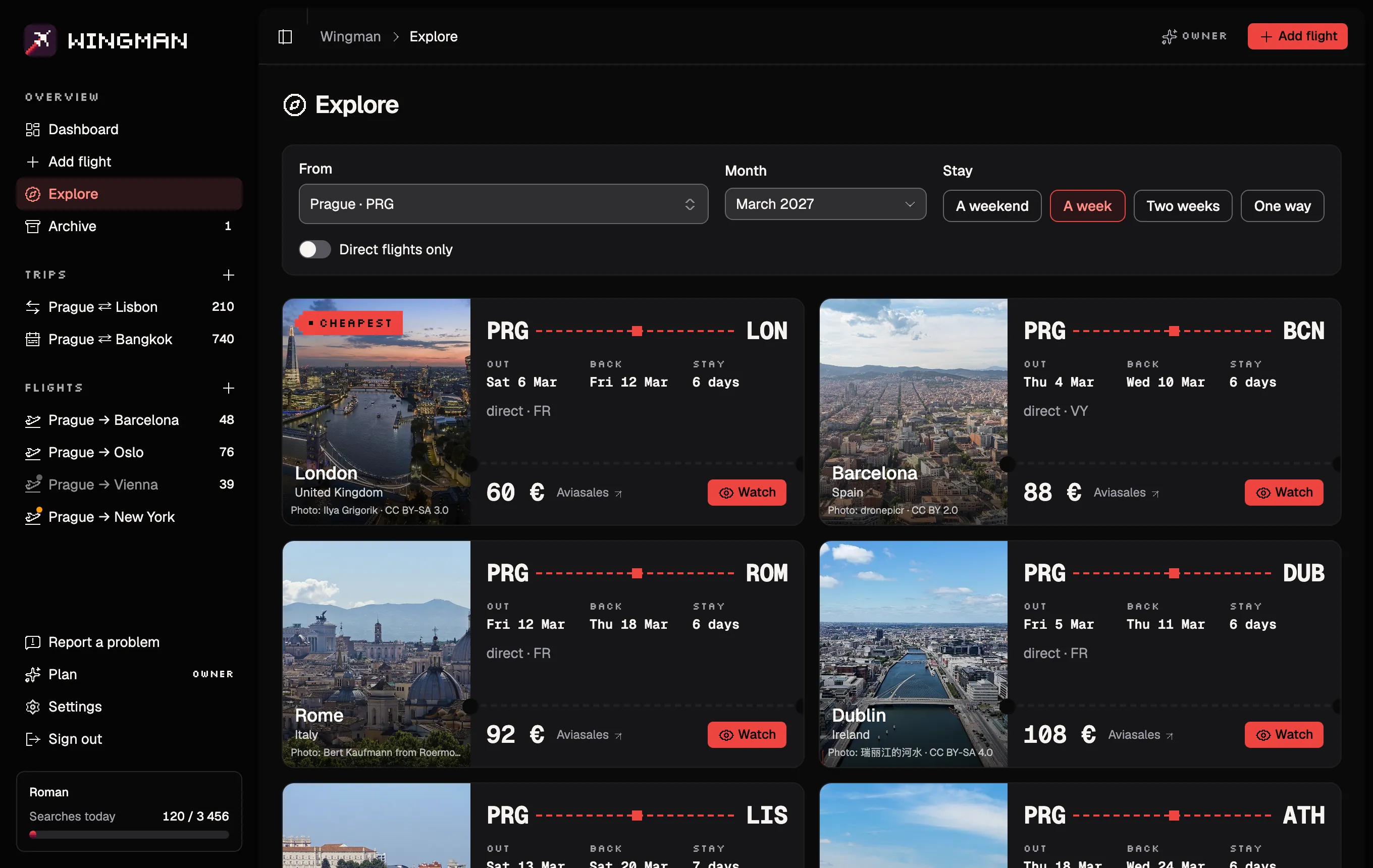
Explore, no account needed
Explore shows where you can fly cheaply from your airport in a given month: each city's cheapest trip, on its photo. Until now it was inside the app. Now anyone can open it from the home page or any city's page, pick an airport and a month, and look around. When a trip looks good, one tap takes you to sign up with it ready to watch.
Month by month
City pages now link to a page for each month, listing where that city flies that month, cheapest first. Handy when you know when you can travel but not where to.
The week's cheapest, on Thursdays
If your account isn't watching anything at the moment, Wingman sends one notification on Thursdays with the cheapest trips from your city for a week next month. It opens Explore right there. It stops while you watch a flight, and Settings can switch it off.
Also new
- Notifications in any browser. Wingman now offers to turn them on in every browser that can show them, not just when it's added to the Home Screen. Only iPhone and iPad still need that.
- A tab bar on phones. The menu moved to the bottom of the screen, where your thumb is.
- Pixel icons across the app, in Wingman's own style, and city photos that come into focus as they load.
- A faster first open. Charts, the date picker and every page beyond your list now load only when you open them.